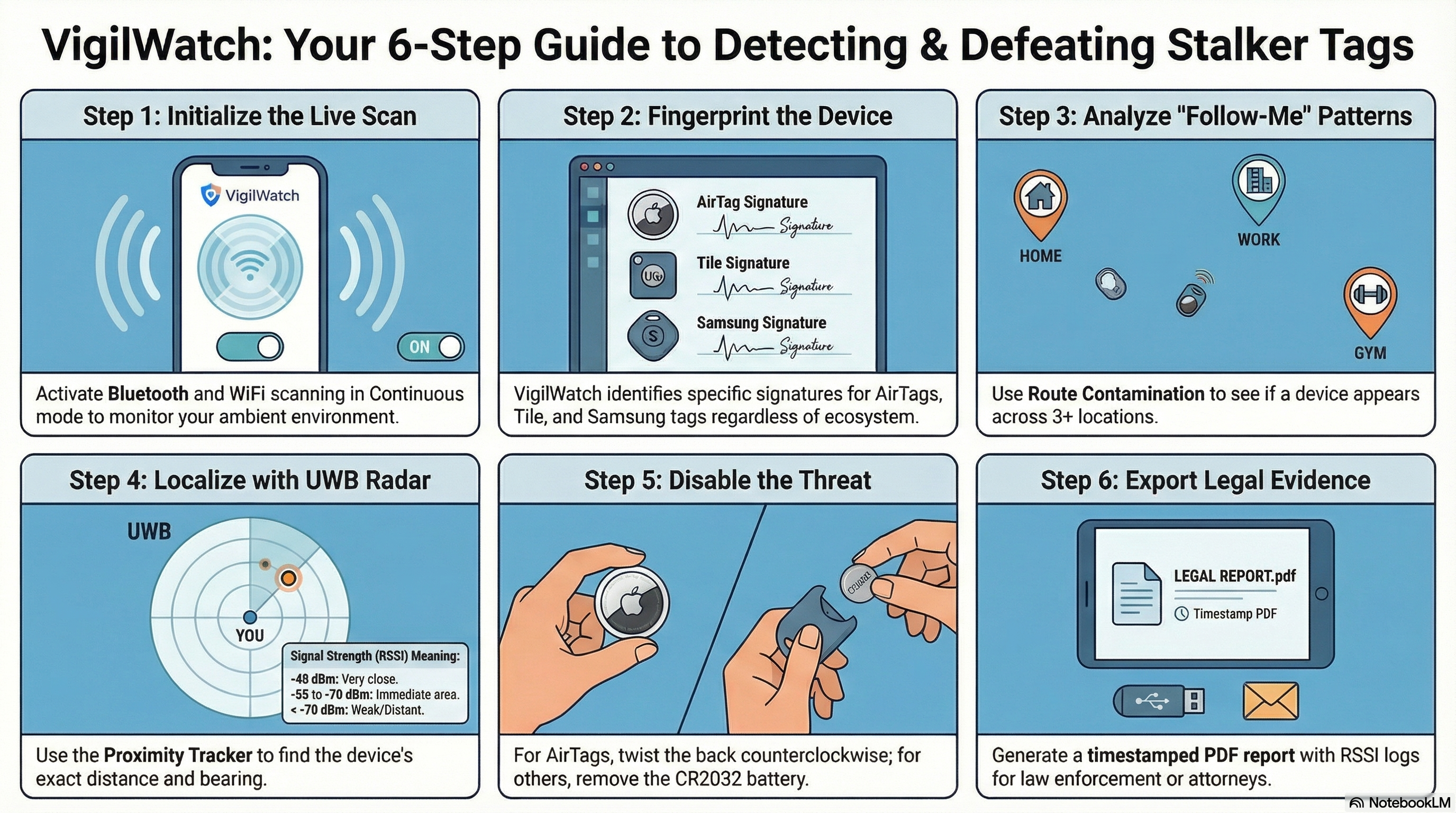
🚀 Quick Start Guide
Get VigilWatch running in under two minutes.
Pro Tip: Set up Home and Office zones before your first scan so that zone names attach to all sightings from day one — this makes exported reports much more useful.
📡 Scan Modes
Choose the right mode for your situation.
iOS Limitation: Apple restricts background Bluetooth scanning on iOS. For the most reliable detection, keep VigilWatch foregrounded during important scans, or set short Interval mode intervals (5 minutes).
🎯 Threat Classification
Every detected device is assigned one of five classification levels.
📍 Follow-Me Detection
The heart of VigilWatch — automatic algorithmic detection of devices following your movements.
If you feel in immediate danger: Call emergency services (911 in the US) first. VigilWatch evidence reports are for documentation — not a substitute for emergency help.
🔍 Tag Fingerprinting
VigilWatch can identify the specific brand of tracker broadcasting near you — without requiring you to be in Apple's ecosystem or having any prior notification from the tracker's manufacturer.
Key advantage: VigilWatch detects AirTags, Tiles, and Samsung SmartTags on any iPhone — regardless of whether you use Apple's notification system, which can be delayed by hours or days.
🗺️ Route Contamination Map
Route Contamination detects trackers that have silently followed you across multiple locations over time — the pattern a stalker's device leaves that a single scan can never reveal.
Tip: Set up named Zones (Home, Office, Coffee Shop, Gym) before using Route Contamination — zone names will attach to sightings, making the evidence report much clearer for law enforcement.
📡 UWB Proximity Tracker
Once you've identified a suspicious device, UWB Tracker lets you physically locate it — narrowing the hiding place to within a few meters.
iOS Note: UWB Proximity Tracker uses BLE signal strength (RSSI) to estimate distance — it is not true Apple UWB/U1 chip ranging. Accuracy improves in open spaces and when moving slowly. Use it to narrow the search area, then do a physical inspection.
📶 Bluetooth Devices
Understanding Bluetooth detection in VigilWatch.
📡 WiFi Devices
Understanding WiFi access point detection.
📱 Managing Devices
The device detail screen gives you full control over how each detected device is tracked and classified.
📍 Location Zones
Named zones make VigilWatch's evidence far more meaningful and actionable.
📄 Evidence Export
Generate professional evidence reports ready for law enforcement or legal proceedings.
Best Practice: Export a PDF immediately when you detect a high-confidence Follow-Me. A COMMUTE PATTERN + ESCALATING trend, across 4+ locations spanning 2+ km, is compelling documentation for law enforcement.
📊 Analytics
Understand the big picture of what VigilWatch has detected over time.
🔒 Privacy
VigilWatch was designed with privacy as the absolute foundation.
Privacy Summary: All data is stored locally on your device. No internet connection is ever required or used. No account, email, or login is needed. Scanning is passive only — VigilWatch never connects to detected devices.
⚖️ Legal Notice
Important information about the legal use of VigilWatch.